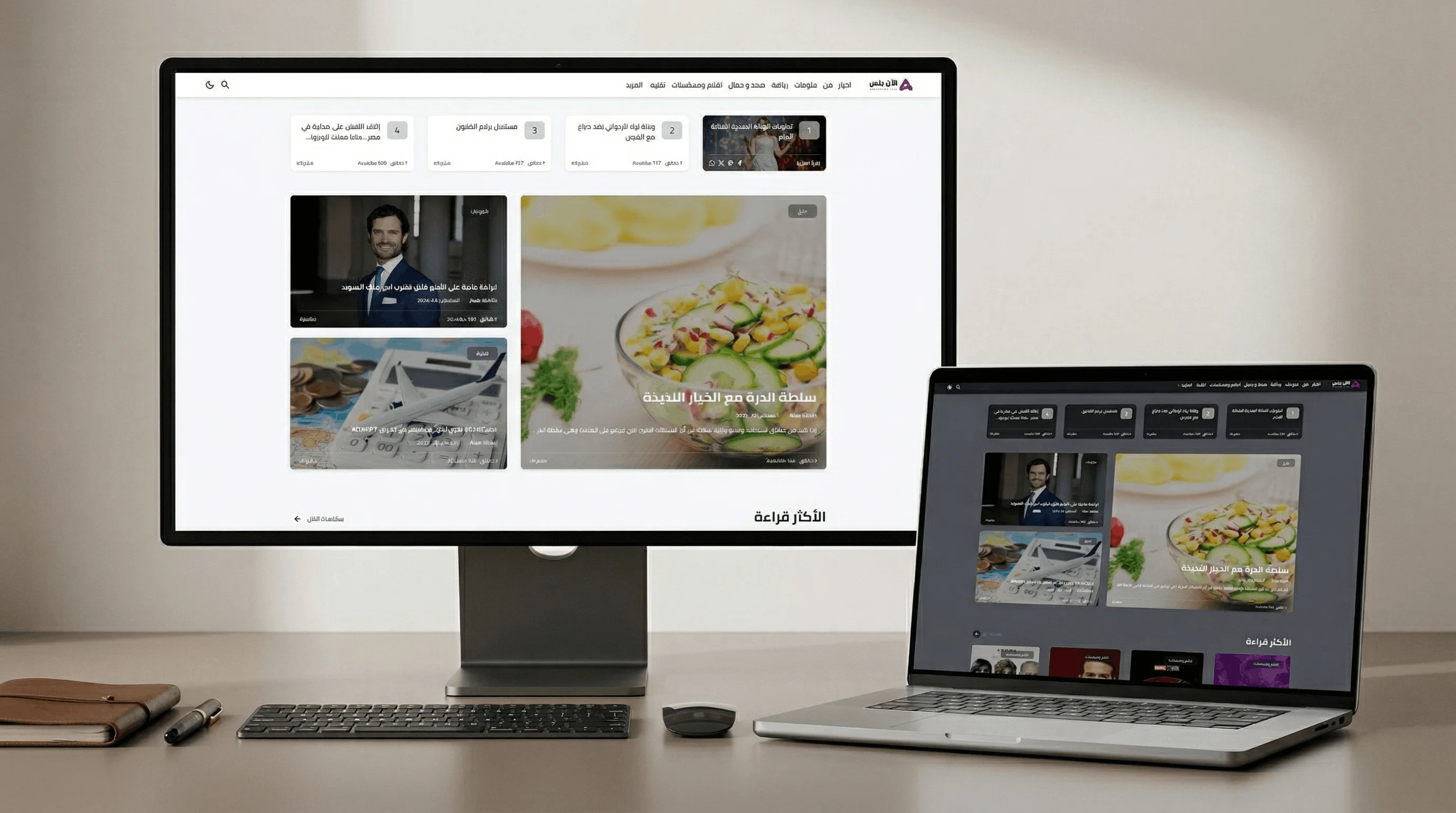
I built Alaan Plus as a complete news publishing platform. Not a blog with extra features bolted on, but a system designed from the ground up for editorial teams that publish content every day.
The platform handles the full lifecycle: writing and editing with auto-save and draft protection, scheduled publishing, direct distribution to Facebook and Twitter/X, automated SEO scoring, push notifications, and a reader experience optimized for speed. Everything lives in one system.
What I care about most in this project isn't any single feature. It's the discipline in the details. A dedicated draft model that auto-saves without ever touching live content. Resource locking that prevents two editors from overwriting each other. A WordPress migration pipeline that safely imports an entire publication without data loss. SEO infrastructure that works automatically so editors never have to think about it.
The platform today serves 10,000–20,000 readers every month. This is a live production system under real traffic, not a portfolio demo.
Core Capabilities
Full article publishing system with Draft, Published, and Scheduled statuses
Auto-save with a dedicated draft model, so no work is ever lost mid-edit
Resource locking to prevent two editors from editing the same post simultaneously
Direct Facebook publishing via Meta Business SDK with attachments and reply threading
Direct Twitter/X publishing via TwitterOAuth with media support and threaded replies
Google Gemini AI integration into the content workflow
OneSignal push notifications to alert subscribers on new posts
Automated SEO scoring per article
Full-text search across all content
WordPress migration pipeline that imports posts, categories, tags, users, and media
Newsletter subscriber management
Google Analytics dashboard built into the admin panel
Actively expanding with new features.
Core Architecture
Unified Publishing & Social Distribution
Content creation and distribution live in the same system. When an editor finishes an article, they can push it to Facebook or Twitter/X directly from the post editor. No switching tools, no copy-pasting links.
The Facebook integration uses the Meta Business SDK. Editors connect their Facebook pages through a settings panel, and the system handles page token management, post creation with image attachments, and reply threading. Everything is stored in a FacebookPost model with full relationship tracking.
The Twitter/X integration uses TwitterOAuth. Posts are created with media support, and threaded replies are stored and tracked in a self-referencing Twitter model.
Both integrations store what was sent, when, and any replies. The editorial team gets a complete record of their social activity right next to their content.
Auto-Save & Draft System
Losing work mid-edit is unacceptable in a newsroom. The platform uses a dedicated PostDraft model that continuously captures the editor's work as they type. The draft is separate from the published post, so auto-saving never accidentally overwrites live content.
A PostComparisonService handles diffing between the draft and the published version, giving editors a clear view of what has changed before they push an update.
Resource locking (via kenepa/resource-lock) ensures that when one editor is working on a post, no one else can open it for editing. No conflicting changes, period. This kind of detail only matters when a real team is using the system. I make sure to get it right.
Scheduled Publishing
Posts can be set to a future scheduled_at timestamp. The system checks this automatically and publishes at the right time. No manual intervention needed. The PostStatus enum drives the state machine: Draft → Scheduled → Published.
SEO Infrastructure
Each article gets:
Meta title and description
Open Graph, Twitter Card, and social sharing meta tags generated automatically
Schema.org Article markup applied to every post
Automated SEO scoring via a custom fork of the SEO scanner. Editors see a score and can fix issues before publishing
Sitemap regenerated on every publish
RSS feed for reader subscriptions
Response caching for fast page loads
WordPress Migration Pipeline
Migrating an existing publication to a new system is one of the hardest parts of any rebuild. I built a full migration pipeline with dedicated background jobs for each content type (posts, categories, tags, users, and media).
The pipeline preserves slugs, re-uploads media to the new storage, and includes a RecordExistenceChecker trait to safely skip already-migrated records. Re-runs are safe.
AI-Assisted Content
Google Gemini is integrated into the content workflow via the google-gemini-php/laravel package, giving editors AI assistance directly inside the post editor.
Admin Experience
Posts & Content
Post Management. Full rich-text editing with TinyMCE, category and tag assignment, SEO fields, featured image with WebP optimization, and scheduling. Each post shows its visit count and popularity rank.
Social Media
Social Media Management. Dedicated resources for Facebook Posts and Twitter Posts, with reply threading shown as relation managers. The Meta Settings page handles Facebook page connection and token management.
Newsletter & Subscribers
Subscriber Management. Subscriber list with status tracking (Pending → Active → Unsubscribed). Full subscriber management from the admin.
Analytics
Google Analytics Dashboard. Embedded directly in Filament with date range filtering. Per-article visit tracking and popularity scoring.
Site Configuration
Site Info. Translatable company details, social network links (Facebook, YouTube, Twitter/X, WhatsApp, TikTok, Telegram, Instagram, Pinterest, Threads), and media covers. All manageable without code.
Performance & Experience
The reader's experience matters as much as the editor's. I designed the frontend around speed and readability:
Clean, fast layout with generous whitespace, large images, and typography tuned for long-form reading
Automatic image optimization. Every uploaded image is converted to WebP, optimized for quality and file size, and served with responsive variants so mobile readers never download a desktop-sized file
Response caching (Spatie) ensures public pages are served instantly without hitting the database on every request
Fast Paginate for efficient pagination across tens of thousands of records
Full-text search with Laravel Scout + TNT Search
Background jobs for heavy operations (migration, notifications, image processing)
Auto-pruning of old drafts to keep the database lean
Category data cached and invalidated on change
My Role
Full system architecture and feature design
Backend development (Laravel ecosystem)
Facebook and Twitter/X API integrations
AI integration (Google Gemini)
SEO infrastructure and automated scoring
WordPress migration pipeline
Push notification system (OneSignal)
Admin dashboard with Filament
Performance optimization and caching
Frontend design for reader experience
Let's Build Something Serious
If you need a content platform that goes beyond a basic CMS (direct social distribution, AI assistance, automated SEO, a full migration pipeline), I'd be happy to discuss your project.